Converting Minecraft Map Coordinates to Real-World Latitude/Longitude
Updated: 19 May 2026
- Add a code snippet showing the actual lookup.
- Separate the two lookup failure modes.
- General pass over the prose.
Given a flat projection of a world map and an x/y coordinate on that projection, how can we derive the corresponding latitude/longitude on the globe?
I wanted to create a simple Minecraft plugin that would allow players on an Earth map to get an accurate lat/long for their position in the real world.
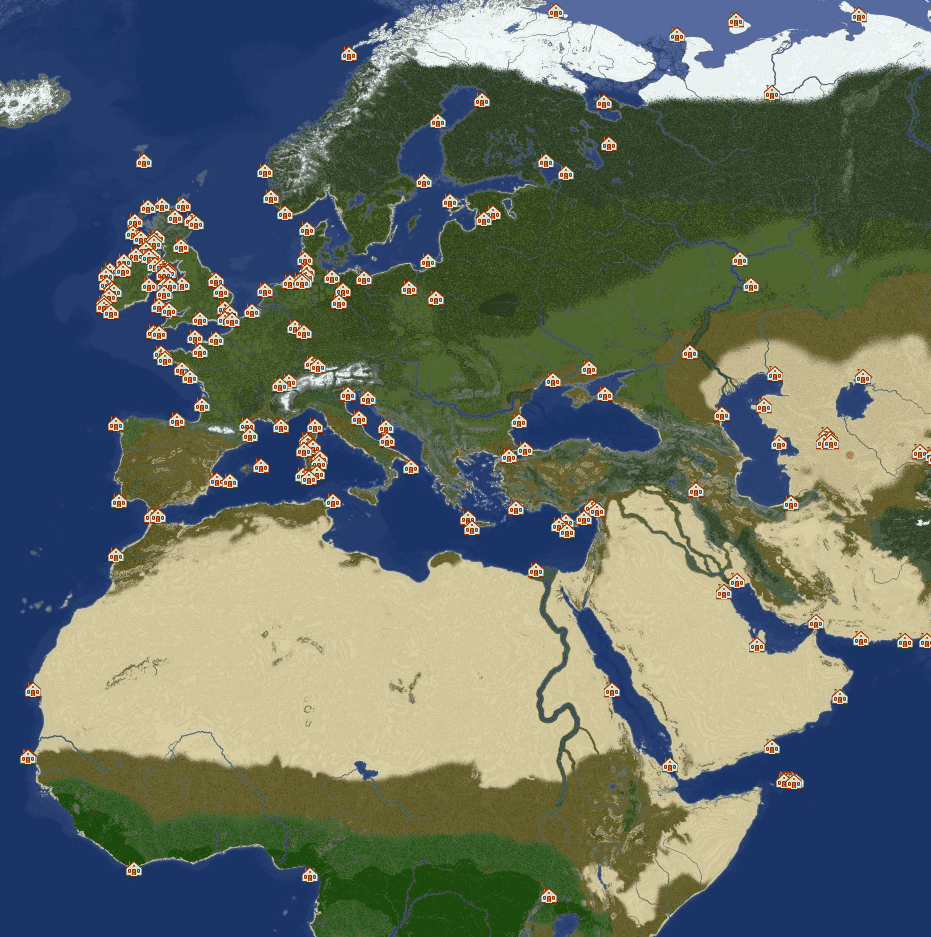
There are many different ways to project the surface of a sphere onto a flat plane, but this inevitably results in some degree of distortion. The projection used for the Earth map is close to a Mercator projection. You can compare it against other projections at map-projections.net; you’ll notice significant differences, especially around Greenland and the islands of northern Canada.
Due to this distortion, the relationship between x/y and lat/long is not linear - a player walking 100 blocks north through Africa will cover more latitude than one walking 100 blocks north through Greenland, because Greenland is stretched far more than Africa by the projection.
With some simple maths and some time spent gathering data, we can account for this distortion and still map x/y to lat/long accurately. To start with, we must create a series of anchor points encompassing the area we care about. In this example, let’s look at how we can do this within Ireland.
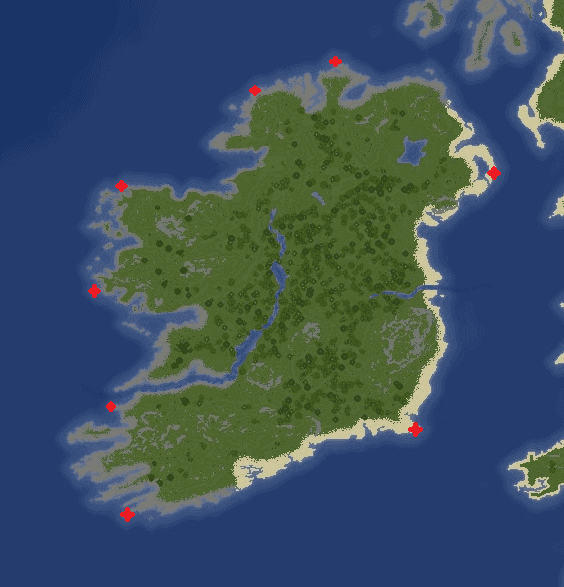
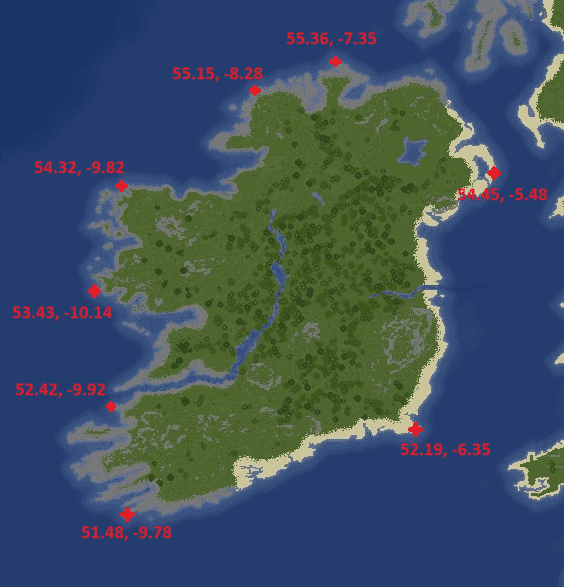
The next step is to gather the real-world lat/long coordinates for each of these anchor points. Doing this will give us a relationship between the x/y coordinate of the anchor point, and the (approximate) lat/long of that anchor point in the real world.
Then, we must create a set of triangles using these points. I use the LocationTech JTS Topology Suite to build a Delaunay triangulation automatically from the set of points.
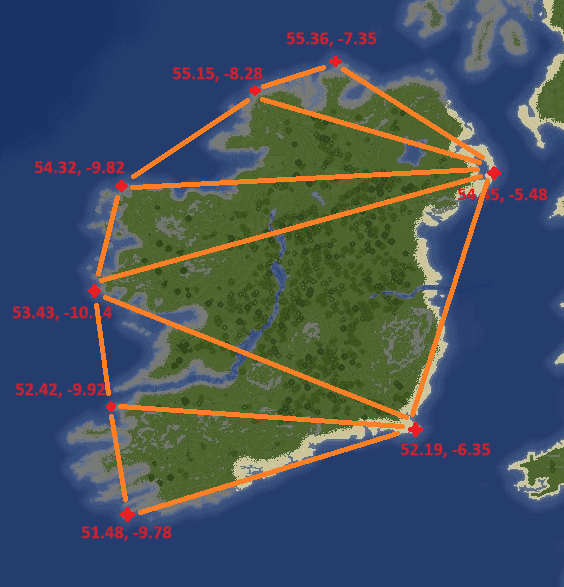
The last step is to take the x/y position (the position of our player) and find the containing triangle for that point. We can then find the barycentric coordinates within that triangle and interpolate using the position within the triangle, and the latitude/longitude attached to the three anchor points which make up the triangle.
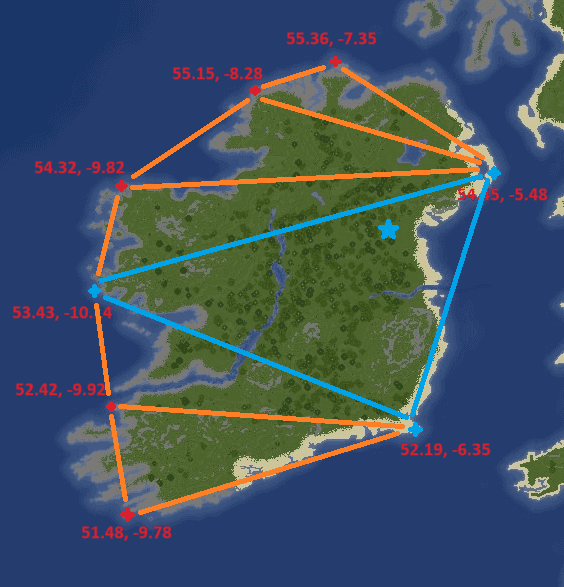
In simpler terms, we find the position within the triangle, then we combine the lat/long of the three anchor points based on how far the point is from each of those anchors. The closer we are to an anchor point, the more weighting is applied to the lat/long from that anchor. In the example above, you can see that we are very close to (54.45, -5.48) and further from (53.43, -10.14) and (52.19, -6.35), so the combination of these three lat/long pairs will be weighted accordingly to give us the approximate lat/long of the blue point.
In the plugin this ends up being fairly small. The whole lookup - find the triangle containing the player, then barycentric-interpolate from its three anchors - is essentially this:
public double[] getLatLong(double x, double z) {
    Point point = new GeometryFactory().createPoint(new Coordinate(x, z));

    for (int i = 0; i < triangles.getNumGeometries(); i++) {
        Polygon triangle = (Polygon) triangles.getGeometryN(i);

        if (triangle.contains(point)) {
            Coordinate[] vertices = triangle.getCoordinates();
            Anchor a = getAnchor(vertices[0]);
            Anchor b = getAnchor(vertices[1]);
            Anchor c = getAnchor(vertices[2]);

            return barycentricInterpolation(x, z, a, b, c);
        }
    }

    return null; // outside every triangle - we don't know where the player is
}
A null result is exactly the “I don’t know where you are” case: the point fell outside every triangle, so there’s nothing to interpolate from.
You can also see, from this small example, a few points of note:
The area we care about should be completely surrounded by anchors - the southwest corner of Ireland is not currently covered by an anchor point. Because the triangulation spans the entire convex hull of our anchors, a player standing here could end up inside a triangle made up of
(52.42, -9.92),(51.48, -9.78), and some third point on the east coast of America. Interpolating within a triangle this large is wildly inaccurate and will likely return a lat/long somewhere in the Atlantic Ocean.Anchors should also be placed inland, and not only around the coast. This is less important with small landmasses, or landmasses with simple coastal geography, but large areas should have a number of anchor points set inland in order to give accurate results.
A higher concentration of anchor points will generally lead to more accurate results, as the triangles will be smaller.
Overall, for a 30,000x15,000 block Minecraft Earth map I used around 500 anchor points. This gives a “good enough” result, but there are still a number of areas that aren’t covered appropriately, and they fail in two different ways. A point inside an oversized triangle (the southwest-of-Ireland case above) still gets an answer - just a wrong one, usually somewhere out in the ocean. A point outside the convex hull of every anchor gets no answer at all: the lookup returns nothing and the plugin honestly says “I don’t know where you are”. It’s worth stressing that the convex hull is convex - it’s a single polygon stretched over the outermost anchors, not the outline of the landmasses - so even with anchors on every major landmass, the open ocean, the edges of the map, and any land beyond the outermost ring of anchors all fall outside it. As you can imagine, it’s quite time intensive to place 500 points with matching lat/long coordinates, so improving this dataset will be a slow process over time.